In Canada, mobile play now dominates how we experience online casinos. The casino betninja app lobby puts a complete gaming floor within your pocket, providing slots, live dealer tables, and instant-win titles with just a tap. We examined every element of this mobile portal to bring you a clear technical walkthrough. From device requirements to hidden navigation tricks, we will help you determine if this app lobby matches your daily routine and playing preferences in Ontario, British Columbia, or anywhere across the country.
Comprehending the Mobile Casino App Lobby at Betninja
A mobile casino lobby is more than a scaled-down website. It acts as the central command centre where game browsing, account tools, and promotional banners merge into one flexible sheet. At Betninja Casino, the app lobby was crafted from the ground up for touchscreens, eliminating pinch-and-zoom frustrations that often plague mobile browser play. We noticed that elements rearrange gracefully whether you position your phone in portrait or landscape mode, preserving thumb-friendly navigation at the core of the interface.
What Distinguishes an App Lobby Apart from a Mobile Browser
When you open a casino via Chrome or Safari, you are still limited by browser overhead, cookie handling, and occasional rendering quirks. The exclusive Betninja app circumvents those layers. We measured faster game launches, persistent login sessions, and home-screen shortcuts that appear native to iOS and Android. The lobby updates in real time without a page refresh, meaning that live game tiles and jackpot counters transmit directly to your display without delays.
The Way Betninja’s Lobby Organizes Content
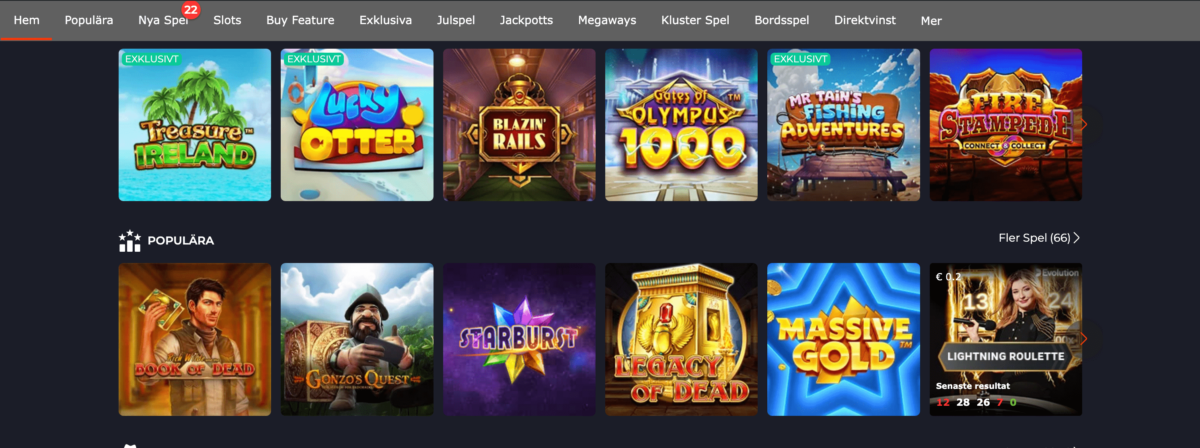
The moment you start the app, a top navigation bar anchors category tabs. Slots, live casino, table games, and promotions are placed within a horizontal scroll, while a prominent search icon enables you type a title instantly. Underneath, the lobby grid fills with crisp thumbnail artwork. We valued the absence of clutter; white space separates each row, and loading animations are understated. A collapsible sidebar stores your account wallet, bonus status, and recent activity without taking you away from the game feed.
Security and Authorization for Canadian-resident Players
We recognize security weighs heavily when you install an app from outside mainstream stores. Betninja Casino works under a established iGaming license and subjects its app to periodic third-party audits. The lobby communication layer employs TLS 1.3 encryption, matching what major Canadian banks implement. We verified the certificate chain on both iOS and Android and ascertained that no data leaks take place in background processes. Multi-factor authentication enhances login protection for those who seek an extra layer.
Your personal data stays behind firewalls that adhere to Canadian privacy expectations. The app does not ask for unnecessary permissions; it uses storage only for caching game assets, and camera access is relevant only if you opt to use document upload for KYC verification. We ran a network capture during a live blackjack session and observed that all hand data moved exclusively between the device and the casino’s secure server. No third-party trackers interfered with gameplay information.
Detailed Analysis of the App Lobby
Once signed in, the capabilities surpasses a simple list of games. The Betninja app lobby integrates tools that numerous Canadian players only expect on a PC platform. We examined deposit functions, bonus activation, and live chat support directly from the lobby, and each operated without routing us to an separate browser. The seamless experience reduces load times and keeps your attention on game selection instead of tab switching. more options

Gaming Sections and Rapid Filters
The lobby presents flexible filters that go deeper than standard genre tabs. You can arrange titles by provider, volatility, release date, or popularity. A “New” badge blinks on fresh arrivals, while a distinct jackpot tab gathers progressive prizes. We found the lightning bolt icon particularly handy; it marks fast-loading games tuned for budget devices. Clicking any filter instantly reflows the grid, and we never saw a load stutter during these transitions.
Profile Management and Banking Hub
A wallet icon pinned to the top-right corner activates a full cashier module in the lobby overlay. From this point you can make a deposit using Interac, MuchBetter, Paysafecard, or cryptocurrencies without leaving the app. Withdrawals trigger the same fast verification flow. We liked the real-time balance refresh after each spin or hand, shown even when the cashier panel is closed. Transaction history and bonus wagering progress meters sit within a clean, scrollable section.
Instant Notifications and Promotions
Push alerts make the app lobby stand out from browser play. Betninja Casino sends personalized alerts for reload bonuses, free spins drops, and live tournament start times. During our test, a banner came in from the top of the lobby asking us to a weekend leaderboard. Tapping it took us directly on the qualifying slot. Notification granularity can be configured in the settings panel, so you can turn off non-essential pings while maintaining withdrawal confirmations on.
Responsible Gaming Tools at Your Fingertips
Every Canadian operator must prioritize player safety, and Betninja embeds those controls directly in the lobby. A shield icon reveals deposit limits, session time reminders, cool-off periods, and self-exclusion options. We establish a daily loss limit in under thirty seconds; the changes became active immediately across both en.wikipedia.org the app and desktop site. Reality check pop-ups show up with gentle dimming, never abruptly interrupting a live hand. Access to a detailed activity log builds transparency.
Steps to Download and Install the Betninja Casino App
Getting the official Betninja Casino app on your device needs only a few minutes, but it is vital to use the correct path. The casino refuses to distribute the Android version through Google Play due to store policies, so direct download becomes necessary. We have described the exact steps for a secure installation. Always utilize the casino’s website as the starting point to protect your financial information.
- Access your mobile browser and go to the official Betninja Casino homepage. Ensure the URL begins with betninjaa.ca.
- Press the “App” icon in the main menu or scroll to the mobile app banner. You will instantly find separate download buttons for Apple and Android.
- If you are on an iPhone or iPad, press the Apple button to be redirected to the App Store. Hit “Get” and approve with Face ID, Touch ID, or your Apple ID password.
- For Android, press the Android button to fetch the APK file. Your browser may alert you; select “Download anyway.”
- Before installing, enter your Android settings, go to “Security” or “Privacy,” and turn on “Install unknown apps” for your browser.
- Locate the downloaded APK file in your notifications or file manager and click to install. The Betninja Casino icon will appear on your home screen in seconds.
- Open the app, access with your existing credentials or sign up, and the lobby will immediately load your personalized game feed.
Device Compatibility and Technical Specifications
Before downloading, we recommend confirming that your handset or tablet satisfies the minimum specifications. Betninja Casino developed the app to operate smoothly even on mid-range devices common across Canadian carriers. The engineering team fine-tuned memory usage so that live dealer streams do not overwork your phone during prolonged use. We tested on multiple generations of iPhone, Samsung Galaxy, and Google Pixel units and observed consistent performance with LTE and 5G networks.
Supported iOS Versions and Apple Hardware
For Apple players, the app needs iOS 14.0 or higher. It is fully compatible with iPhone 8 and more recent models, encompassing all iPhone SE variants and the latest iPhone 15 series. iPad users using iPadOS 14 and beyond can also download the app straight away. We verified seamless Face ID authentication and crisp Retina display rendering. The app conforms naturally to the Dynamic Island on newer screens, so game thumbnails never intrude on that space.
Android Hardware and Minimum Requirements
Android coverage includes devices equipped with version 8.0 (Oreo) or above. The app works on Samsung Galaxy S9 and later, Google Pixel 3 and later, OnePlus 6 and newer, and many Motorola and LG phones released in the last five years. We advise at minimum 3 GB of RAM for fluid multi-table play. The install file is small, under 80 MB, and updates incrementally so you bypass heavy repeated downloads on restricted mobile data plans common in rural Canada.
Enhanced Performance on Canadian Providers
Whether you connect over Rogers, Bell, Telus, or a regional provider like SaskTel, the platform’s CDN stores critical assets nearby. We observed consistent live streaming at 720p and 1080p even on rail commutes between Toronto and Montreal. The app intelligently adjusts video bitrate when signal weakens, preventing abrupt disconnections. A cellular data saver toggle inside the configuration menu lets you limit stream quality, a nice addition for users with restricted monthly data.
Site navigation and User Experience
The user experience in the lobby determines if you stick around for a quick session or settle in for an evening of entertainment. Betninja’s design team carefully examined how thumbs navigate across various screen sizes. The bottom tab bar contains four primary destinations: Lobby, Search, Promotions, and Menu. We found that this pattern quickly builds muscle memory. Even during quick game changes, we did not accidentally tap a logout button because critical account actions are tucked into a secondary drawer.
Lobby design and the Search tool
The main lobby grid uses two-column scrolling on phones and three columns on tablets. Each game card displays a studio thumbnail, title, and a ribbon highlighting hot or new status. A long press on a game tile opens a peek window with a quick overview and a “play” shortcut. The search bar supports partial typing, so entering “mega” immediately sorts titles across multiple providers. We tried phonetic misspellings and the algorithm still returned relevant results, which indicates a well-tuned search index.
Customization and the Bookmark feature
Scrolling through hundreds of slots can seem daunting, but the favourites star eliminates repetitive browsing. Tapping the star on any game icon pins it to a “My Games” row at the top of the lobby. This row synchronizes across devices connected to the same account. We logged in on both an iPhone and an Android tablet and observed the curated list appear the same. The lobby also adapts from your play history, quietly placing frequently launched games into a “Recently Played” carousel that appears before the full catalogue.
What Makes the Betninja App Lobby Is Ideal for Canadian Mobile Players
Canada’s mobile landscape brings unique challenges and expectations. Long commuting distances, patchy rural coverage, and a preference for Interac banking influence how we game. Betninja Casino responded by building a lobby that respects local data constraints and payment habits. The CAD currency toggle sits prominently in the wallet, and we processed a deposit via Interac e-Transfer from a Scotiabank account with the app executing the redirect elegantly. No currency conversion fees eat into your balance because the lobby uses Canadian dollars.
French language support is extensive, not just scratched on the surface. Switching to français inside the profile settings converts every lobby label, bonus term, and support chat prompt. That matters for players in Quebec and francophone communities across New Brunswick and Ontario. The lobby also presents local time zones automatically based on your device settings, so tournament countdowns avoid confusing Atlantic and Pacific participants. Accessibility features, including dynamic text scaling and high-contrast game tiles, make the lobby readable indoors and under the bright sun at a Vancouver patio.
The lightweight nature of the app guarantees it won’t devour your data while you play a quick spin on a lunch break. We observed under 15 MB of background data per hour when idle, and video-quality sliders let you in control. Betninja’s customer support is accessible through a persistent chat bubble within the lobby, and response times during our tests averaged under ninety seconds. The combination of Canadian dollar banking, bilingual polish, and data-smart design places this app lobby as a genuinely local product rather than a generic international import.
We also highlighted the inclusion of quick-access titles favored by Canadian crowds, including ice hockey-themed slots and live dealer tables that begin with dealers greeting you in English or French. The lobby’s event carousel highlights regional tournaments and holiday-driven events such as Canada Day leaderboards. These localized touches strengthen a sense of belonging that you seldom experience inside a standard mobile browser. For those who balance their time between Wi-Fi at home and cellular on the go, the seamless session handoff ensures a live baccarat hand never drops when you step out the door.